Product tour
Every bill. One statement.
Capitops connects to the places your money actually goes, normalizes all of it onto one open standard, and then does the work a FinOps specialist would — if you had one. Here is the whole product, in the order you'd use it.
Step one
Connect the bills
Nine sources, each with the narrowest read-only access the provider offers. Most take a few minutes; none of them can change anything in your account.
Four clouds
ConnectionsAWS, Azure, Google Cloud and Oracle Cloud, read from each provider’s own cost export rather than a polled API — so you get full resource-level detail and a year of history, not a summary.
AI and developer spend
ConnectionsOpenAI, Anthropic and GitHub, so model and CI costs sit in the same statement as your infrastructure instead of arriving separately on a credit card.
Identity and licences
ConnectionsMicrosoft 365 and Okta bring seat counts in, which is what makes unused-licence waste visible at all.
One normalized shape
Every source is mapped onto FOCUS 1.4, the open billing standard — which is why a Google Cloud line and an Oracle line can sit in the same table and actually be comparable.
Understand
See where the money went
The part every tool claims. The difference here is that every number stays traceable to the line item underneath it.
One dashboard for everything
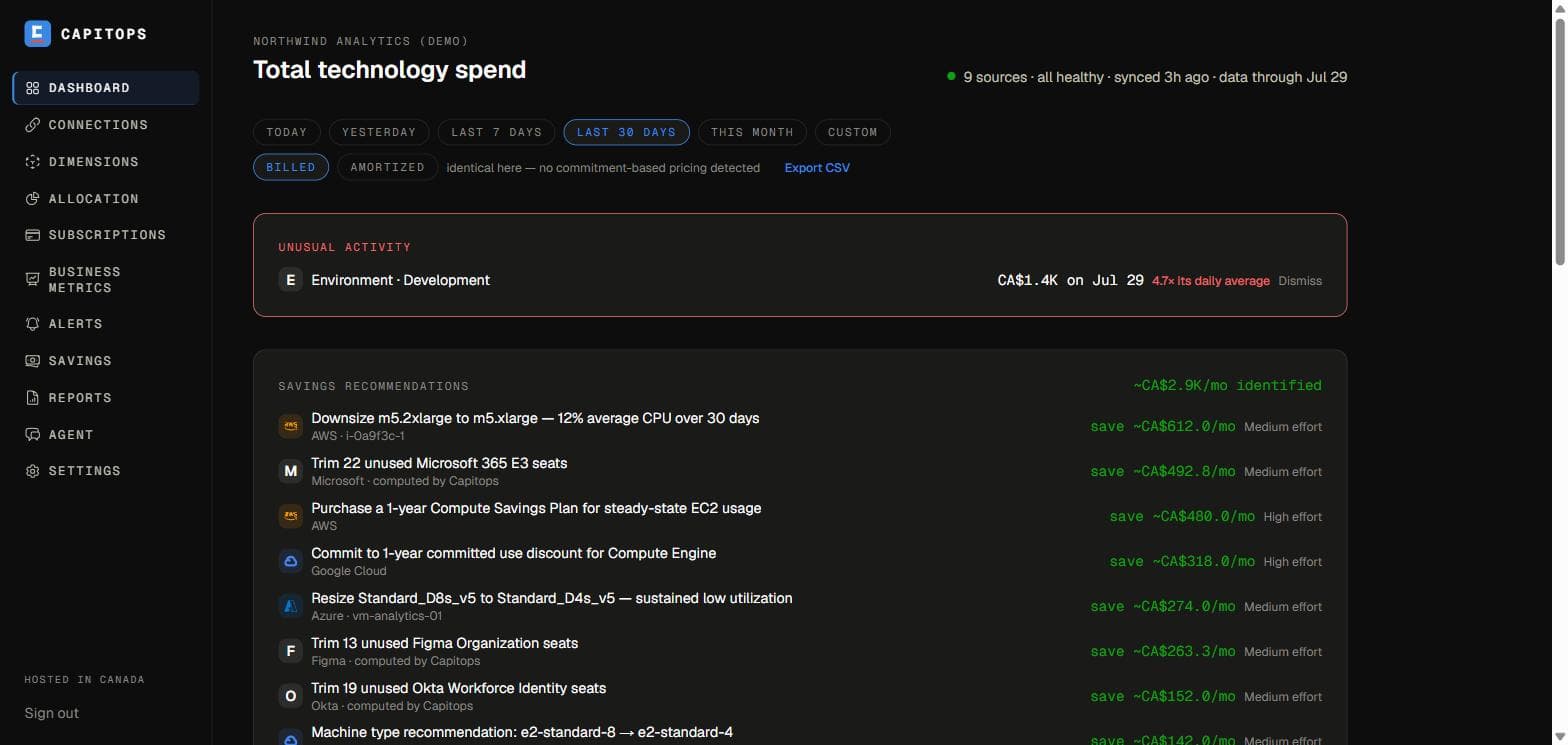
DashboardTotal spend, trend, and the biggest services across every connected source at once — kept per currency, never summed across them, because a CAD total and a USD total are not the same number.
Drill down to the resource
Connections → any sourceClick a service and see which resources actually drove it, down to individual line items. A cost you can’t trace is a cost you can’t argue with.
Allocation
AllocationSlice spend by account, by tag, or by your own custom dimension — with untagged spend shown as its own honest bucket rather than quietly redistributed.
Custom dimensions
DimensionsDefine groupings the cloud doesn’t know about — team, product, environment, customer — using ordered match rules. Cross any two of them to get a pivot table (team × environment, say). Shared costs can be split across members by percentage or in proportion to usage.
Billed or amortized
Dashboard, AllocationOne toggle switches every figure between what you were billed and the amortized view that spreads commitments across the period they cover.
Quantify
Know what's changing, before the invoice
Reporting tells you what happened. This is the part that tells you what's happening.
Forecasting
DashboardA projection of where the month lands, based on the spend pattern so far rather than a flat average.
Anomaly detection
DashboardSpikes and newly-appearing services surface automatically, measured against each source’s own trailing baseline. Anomalies can be detected per dimension member too — so a spike inside one team shows up even when the org total looks calm. Dismiss one and it stays dismissed for that day only, so a genuinely new spike next week still reaches you.
Budgets and alerts
AlertsSet a budget or a spike threshold and get it in Slack. Scope a rule to everything, one cloud, one tag, or a single dimension member — and the alert names the largest driver, not just the number.
Unit economics
Business metricsUpload a business metric — customers, orders, active users — as a two-column CSV, and see cost per unit over any period. Spend going up is only bad news if it isn’t buying more of something.
Subscriptions
SubscriptionsTrack the SaaS that never appears on a cloud bill, with renewal dates and seat counts, so the annual invoice stops being a surprise.
Optimize
Act on what's wasted
Recommendations from every provider's own engine, plus the ones nobody else computes — in one list, ranked, with the effort each one costs you.
Every provider's recommendations, together
SavingsRightsizing, idle resources and commitment advice from all four clouds in one place, rather than four consoles nobody logs into.
The ones we compute ourselves
SavingsUnused licence seats, renewal windows worth renegotiating, AI batch-processing opportunities, and non-production resources billing through the weekend. Each is labelled as computed by Capitops, so you always know whose recommendation you’re reading.
Effort, not just savings
SavingsEvery recommendation carries a rough effort rating, because the cheapest saving isn’t always the one worth doing first. Dismiss what doesn’t apply and it stays gone.
Commitment coverage
SavingsHow much of your usage is covered by commitments, and your effective savings rate — the blended discount you’re actually achieving versus list price.
Whose cost is it
SavingsRecommendations show which dimension owns the affected resource, so the work lands with the right team.
Ask
Get answers without building a report
The parts that do the work for you, on a schedule or on demand.
Ask your bill in plain English
Agent“What did we spend last month, and how does that compare to the month before?” The agent reads the same data every other page shows, answers with real figures, and links to the view that proves each one. It’s read-only — it cannot change anything in your accounts.
Saved reports
ReportsDescribe the table you want once; it’s saved under a name and refreshed daily, so the question you ask every Monday answers itself.
Monthly digest
SettingsA plain-English summary of the month’s spend, what moved, and what to look at — delivered to Slack.
Your data, portable
Connections, SettingsExport any period to FOCUS-standard CSV, or connect an AI tool of your own to the read-only MCP server and query your spend from wherever you already work.
What it doesn’t do
Capitops never writes to your cloud accounts. It won’t resize an instance, buy a commitment, or delete a resource — every recommendation is something you action yourself, in your own console, with your own change process. That’s a deliberate boundary, not a missing feature: read-only access is a much easier thing to hand a vendor, and the security page spells out exactly what each connection can see.
Try it on your own bill
The free plan connects one source and needs no card. Connect an account, wait for the first sync, and you’ll see your own numbers rather than a demo tenant’s. Questions before you connect anything — email hello@capitops.com.